Enterprise project orchestration, reimagined.

Commercial, operational and financial intelligence in one commanding platform — from the first enquiry to final handover. Works with any ERP, engineered native to Microsoft Dynamics 365 Finance & Operations.
  • Works with any ERP
  • Native to Microsoft Dynamics 365 F&O
  • AI-native by design
One platform · every discipline
Civil·Infrastructure·MEP·HVAC·Electrical·Fire Fighting·Plumbing·Telecom·Solar EPC·Oil & Gas EPC·Industrial Shutdown·Marine·Interior Fit-out·Facility Management· Civil·Infrastructure·MEP·HVAC·Electrical·Fire Fighting·Plumbing·Telecom·Solar EPC·Oil & Gas EPC·Industrial Shutdown·Marine·Interior Fit-out·Facility Management·
app.buildorch.io
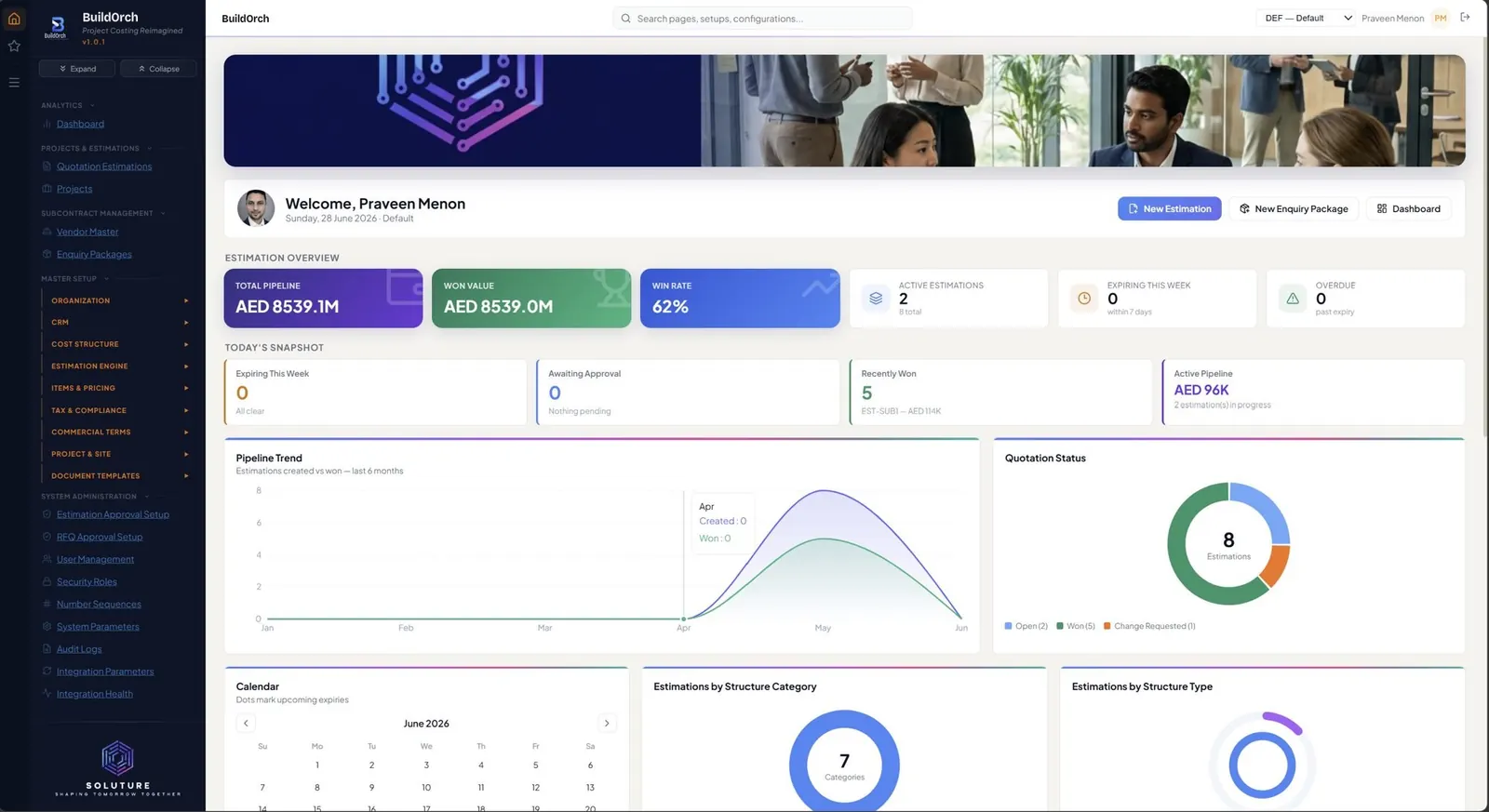
BuildOrch Home — Estimation Overview, Today's Snapshot, charts by Structure Category and Type
Built for the people who build.
0
Masters managed end-to-end
0
Interactive analytics dashboards
0
AI workflows out-of-the-box
0
D365 F&O native connector
One platform · the entire lifecycle

The whole lifecycle — and what makes it different.

Fifteen stages from first enquiry to final handover. Hover the BuildOrch core to reveal the six things that make it an enterprise platform — ERP, AI, multi-entity, emailing, audit and security.
⚡ Agentic AI

Everyone else built a chatbot.
We built something that finishes the job.

Ask most “AI” for an estimate and you get advice. Ask BuildOrch and you get the estimate — drafted line by line, priced by the engine, every quantity traceable to the drawing it came from.

1 Upload2 Review3 Buildone click — nothing commits until you approve
Estimation

Still pricing tenders by hand?

Upload the drawing. BuildOrch builds the entire estimation — every line priced from your item master, every quantity traceable to the drawing.

RFQ & bids

Still retyping vendor quotes?

Drop in the vendor’s reply — PDF or Excel. Every line, rate, inclusion and exclusion is extracted, reconciled and ranked.

WBS

Still planning from a blank page?

Point BuildOrch at the won estimate. A phased, cost-loaded WBS appears — activities, structure, budget — ready to baseline.

Under the hood

The BuildOrch Backbone.

Six systems that quietly do the heavy lifting under every estimate, project and report.

01 · AI Suite

AI that does the work, across the whole project.

Three agentic workspaces that don't advise — they build. Priced by your engine, traceable to the source, and held for your review before anything commits.
  • Estimations agent — a full estimation from a drawing or BOQ
  • Enquiry Package agent — vendor bids extracted, reconciled, ranked
  • Project Planning agent — a cost-loaded WBS, ready to baseline
  • 25 more AI workflows across cost, schedule, risk & quality
  • Priced by the engine — never by the model
Talk to us about the AI suite
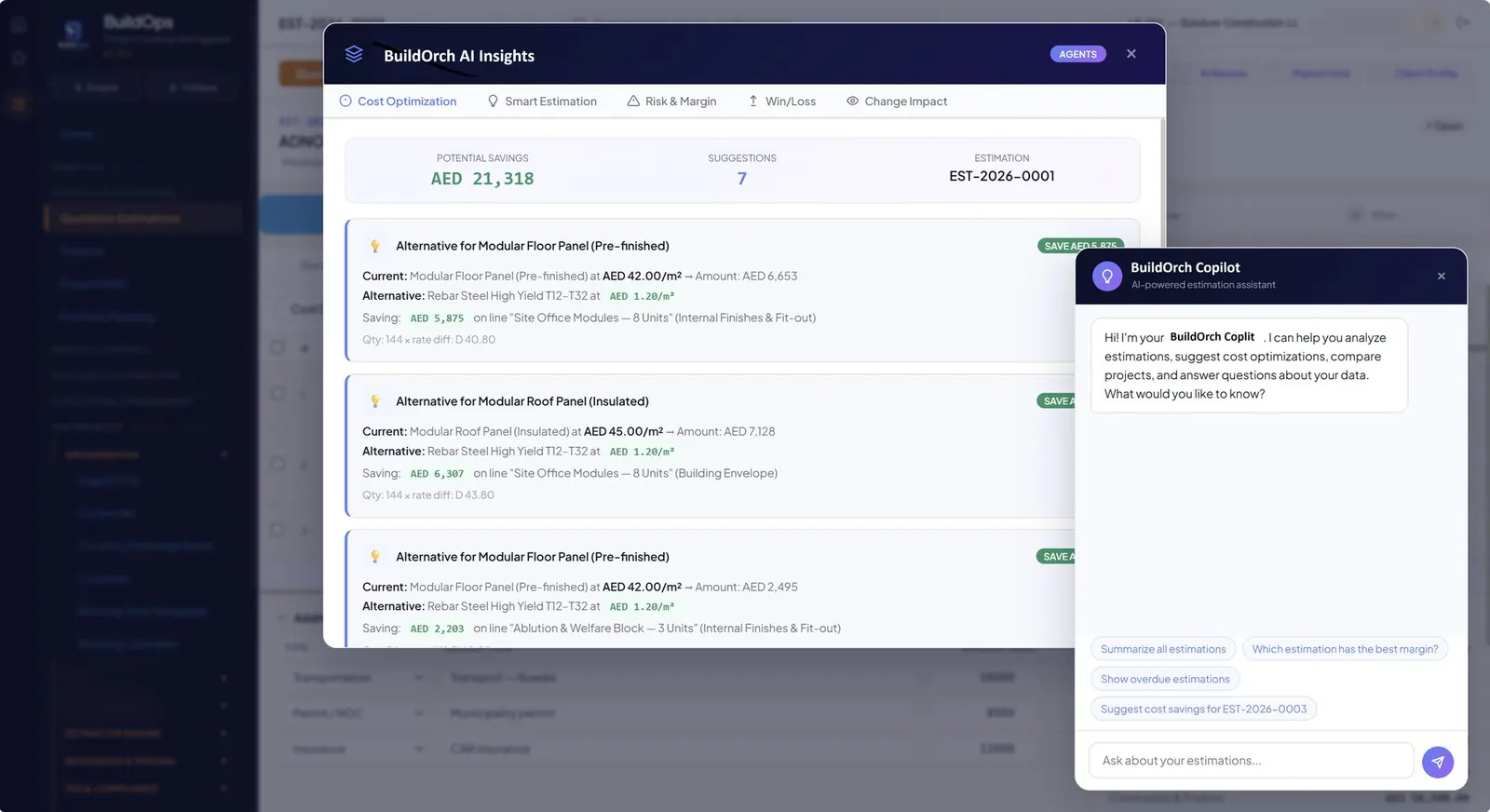
BuildOrch AI Insights — Cost Optimization with material alternatives, plus the BuildOrch Copilot conversational assistant
02 · Master Data Hub

One clean spine for 50 masters.

Logically grouped into eleven domains — Organization, CRM, Cost Structure, Calculation Engine, Commercial Terms, Project & Site, and System Admin — with dependency checks that prevent silent breakage.

  • 18 cross-master dependency rules built in
  • Dynamic currency, UoM and category dropdowns everywhere
  • Role-based access on every sub-master
See how it scales
BuildOrch Master Setup — Structure Categories grid, with the full Master Setup navigation showing Organization, CRM, Cost Structure, Estimation Engine, Items & Pricing, Tax & Compliance
03 · Approvals, Revisions & Audit Logs

Every approval, immortalised. Every action, logged.

The moment an estimation is Submitted for Approval, BuildOrch freezes a complete revision — pricing, currency, markups, package mix. And beneath every revision sits a full audit log: who changed what, when, and from which value to which.
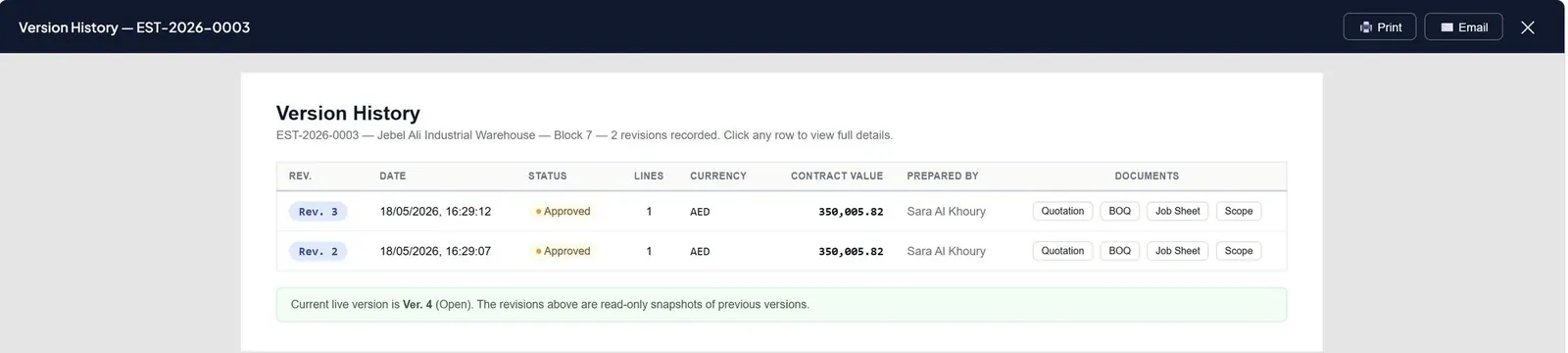
  • Versioned snapshots on every submission
  • Field-level audit log — who, what, when, old → new
  • Side-by-side revision compare & branded PDFs
View the audit story
BuildOrch Version History modal — frozen revision snapshots with date, status, currency, contract value, prepared-by, and per-revision document links (Quotation, BOQ, Job Sheet, Scope)
04 · Branded Reports

Documents that wear your identity.

Every artefact BuildOrch emits — quotations, BoQs, job sheets, scope of work — is rendered with your Legal Entity's full visual identity. Logo, address, contacts, TRN, watermarks: applied automatically, traceable to source.
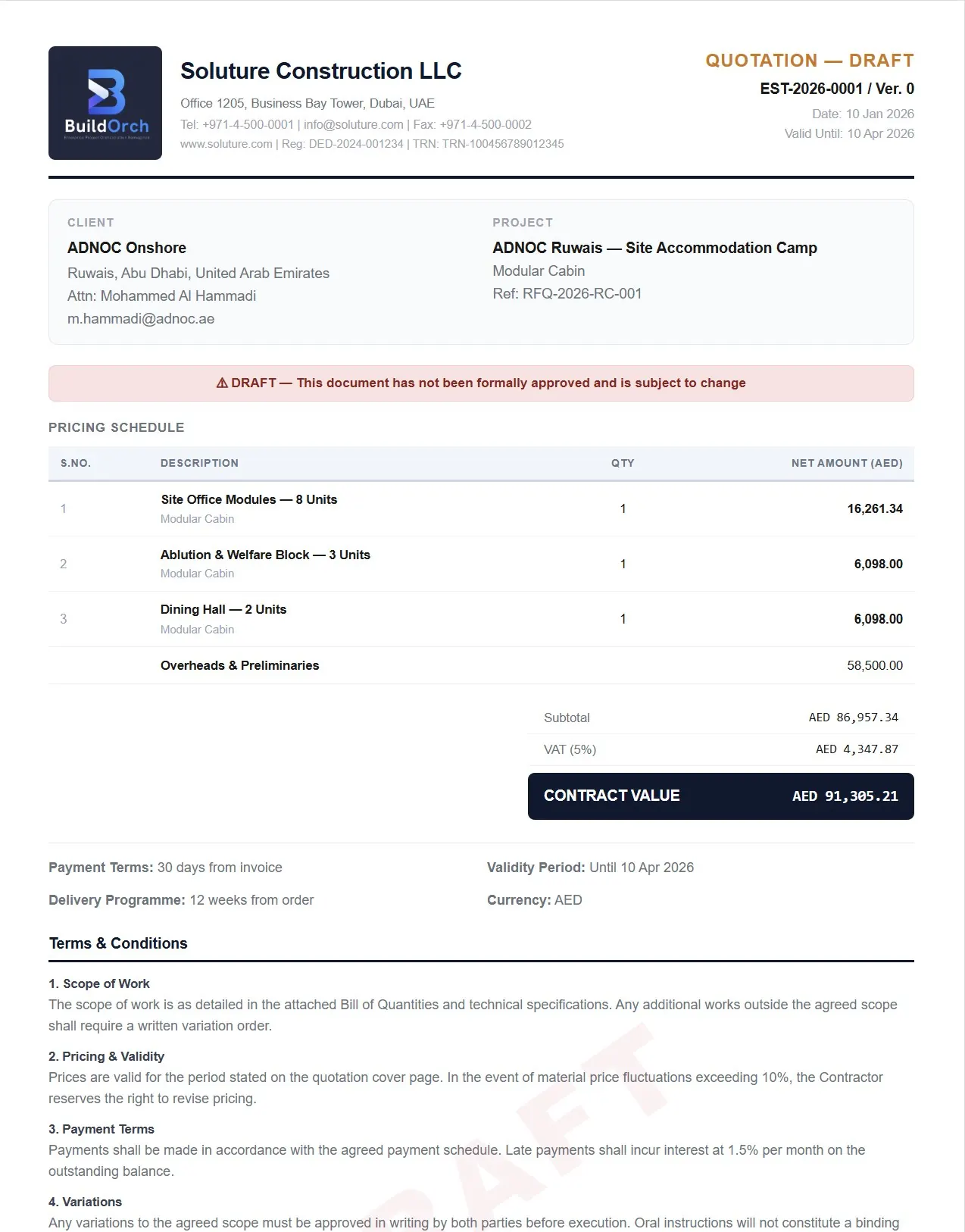
  • Customer-facing PDFs in your brand
  • Automatic DRAFT watermarking until approved
  • Print & email straight from the platform
  • Every line traceable back to its source rate
See the report framework
BuildOrch Quotation report — branded with Soluture Construction LLC company identity, including header, TRN, draft watermark, pricing schedule, contract value summary, and full terms & conditions
05 · Document Attachments

Every file, attached where the work is.

Drawings, specs, signed quotes, photos — attach any document straight to the estimate, package or project it belongs to. Versioned, previewable, and never lost in an inbox.
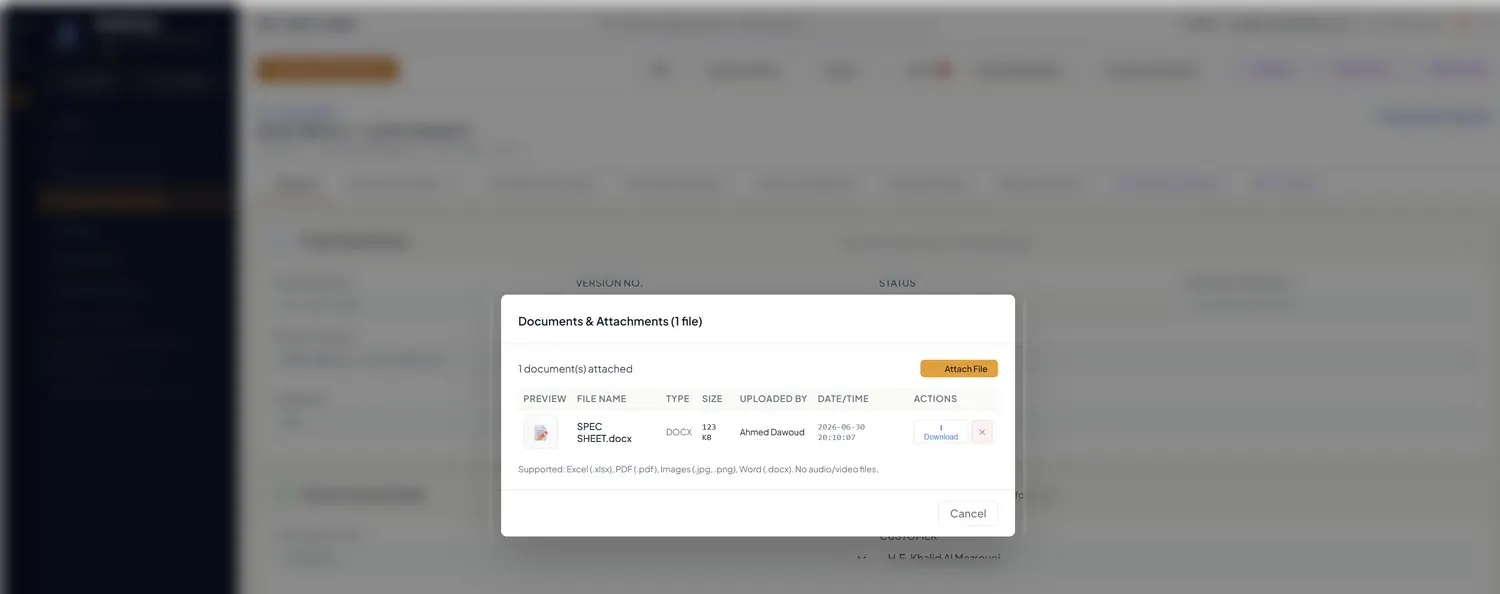
  • Excel, PDF, images & Word supported
  • Versioned with full upload history
  • Attached in context, on every record
  • Role-based access on every file
Talk to us about attachments →
Document attachments
06 · Import / Export Framework

Data in, data out, in bulk.

Every list in BuildOrch imports and exports in bulk — no re-keying. Bulk-load your masters, round-trip data through spreadsheets, and back up any table in a single click.
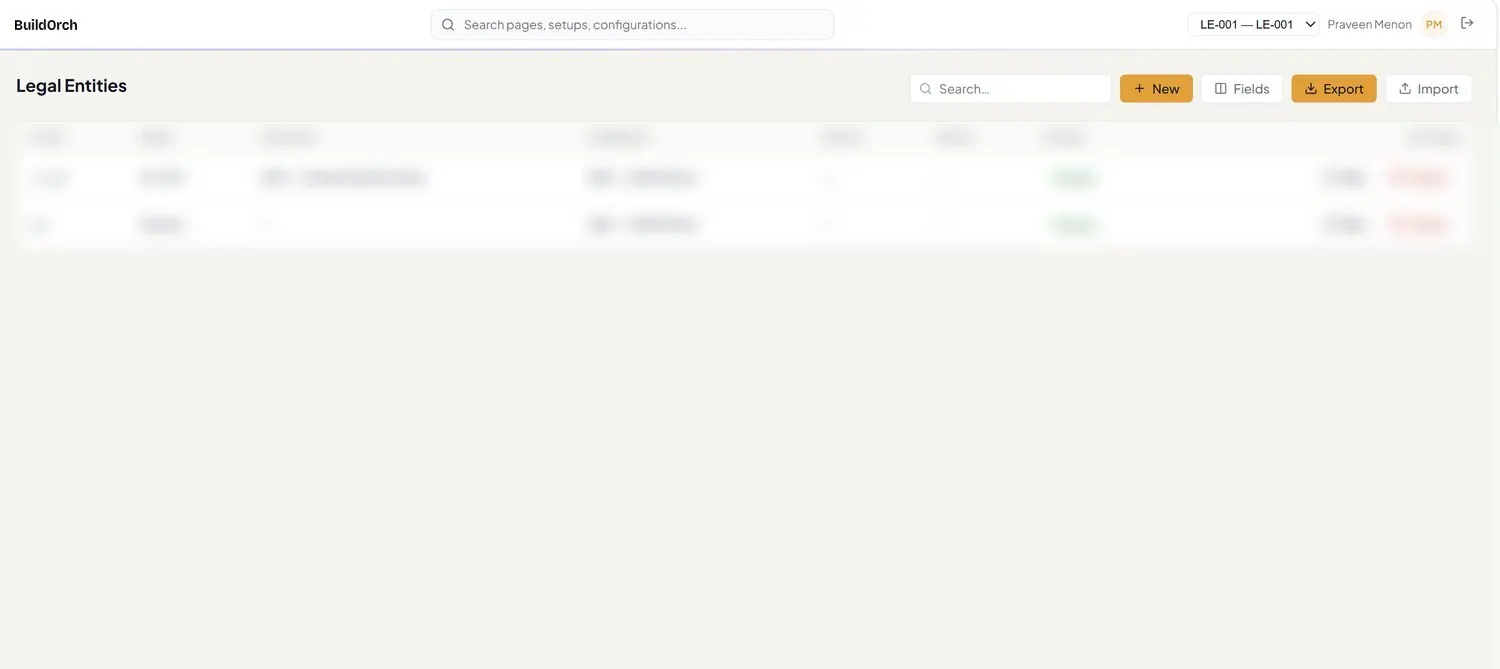
  • Bulk import with built-in validation
  • One-click export & backup
  • Round-trip through spreadsheets
  • Available on every list in the product
See the framework →
Import / Export
Built different

Why BuildOrch isn't a generic application.

Most tools that manage projects started life as something else. BuildOrch didn't — and it shows in three places you can't retrofit.

The generic way

A finance module, stretched over projects.

Projects live as ledger dimensions. Estimates live in spreadsheets — emailed around, re-keyed, version-guessed. "Controls" means a report after the fact. It works, right up until the number has to be defended.

The BuildOrch way

A product that starts at the enquiry and ends at the handover.

Estimates are living, versioned objects. Planning controls are built in, not bolted on. And every figure traces back to the moment — and the person — that created it.

🔒

Your estimates are your IP.

Your pricing, history and know-how stay yours — never pooled, never used to train anyone else's model.

🗄️

Your ERP stays the source of truth.

BuildOrch is where the work happens; your ERP stays the single financial record. No tug-of-war over the numbers.

Agentic AI, not a chatbot.

Agents draft the estimation, rank the vendor bids and compose the WBS — priced by your engine, held for your approval.

Live dashboards

Watch the whole pipeline breathe.

A live tour through the interactive dashboards your team lives in every day.
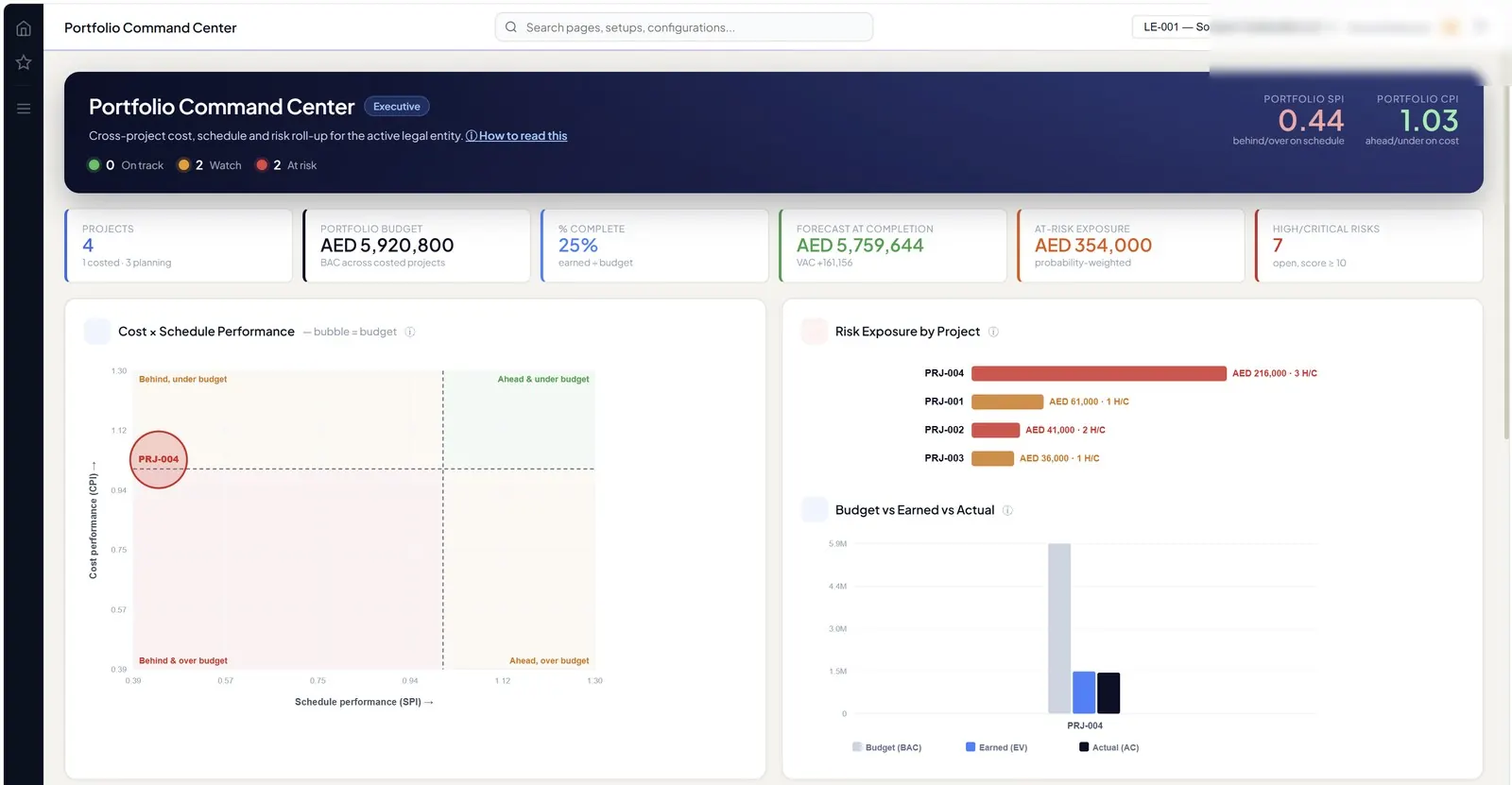
app.buildorch.io / analytics / command-center
Portfolio Command Center
Portfolio Command CenterCross-project cost, schedule & risk roll-up — portfolio SPI, CPI, forecast & at-risk exposure
app.buildorch.io / analytics / command-center
Portfolio Command Center
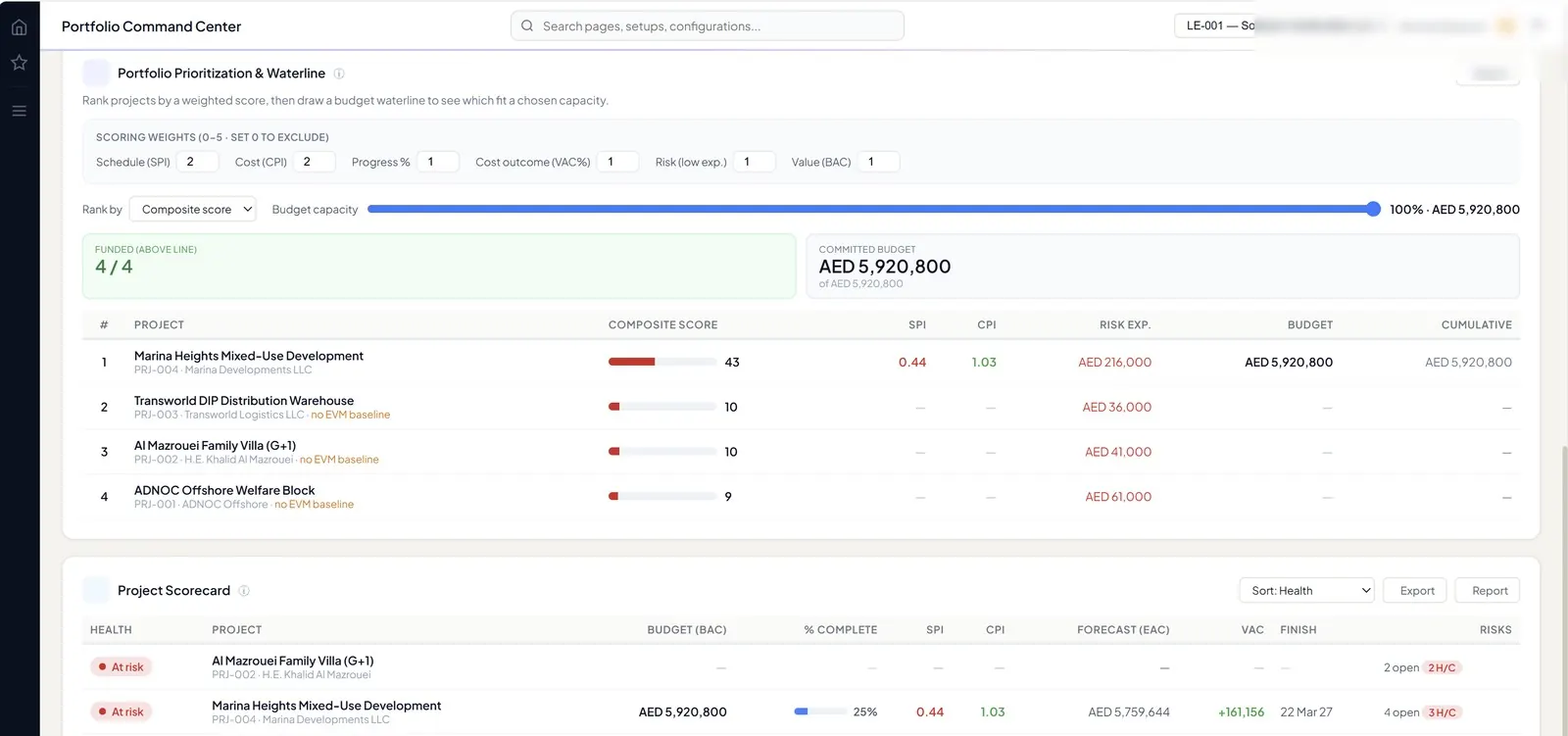
Portfolio Command CenterPrioritization & waterline, plus a project scorecard ranked by health
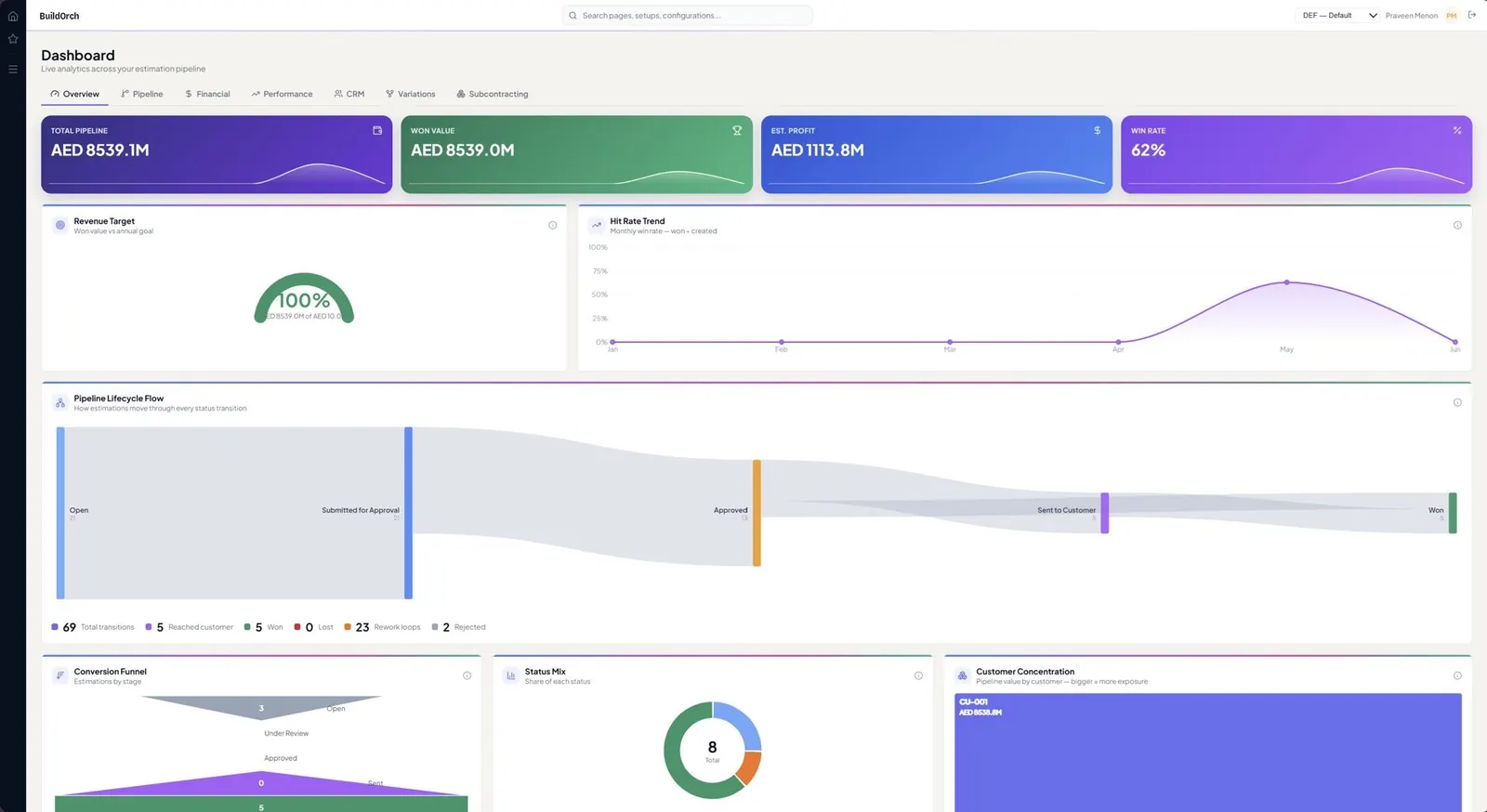
app.buildorch.io / analytics / overview
BuildOrch Overview analytics dashboard
OverviewPipeline health, win rate, quotations & estimations needing attention
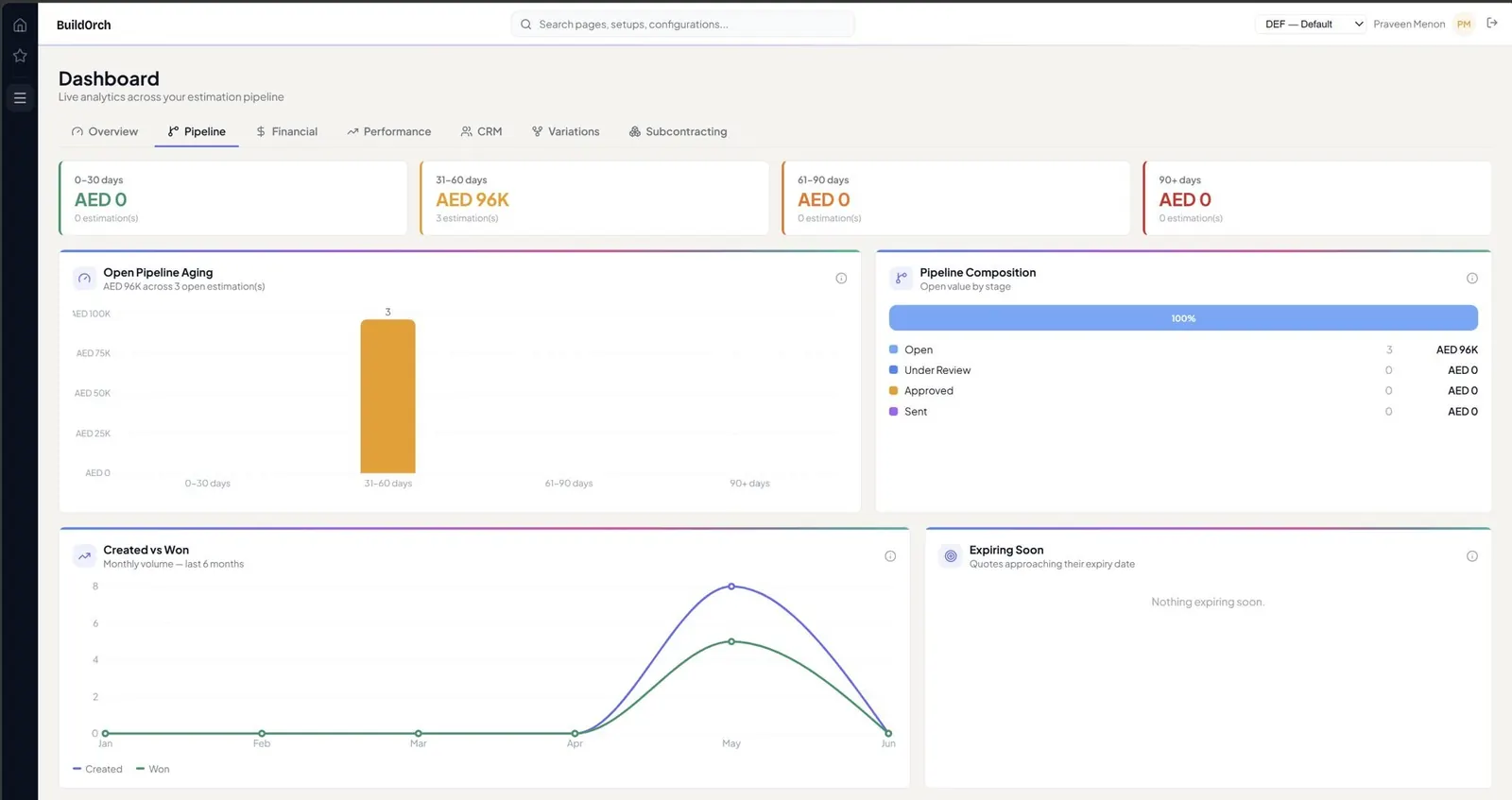
app.buildorch.io / analytics / pipeline
BuildOrch Pipeline analytics dashboard
PipelineContract value by structure type, value by stage, aging heatmap
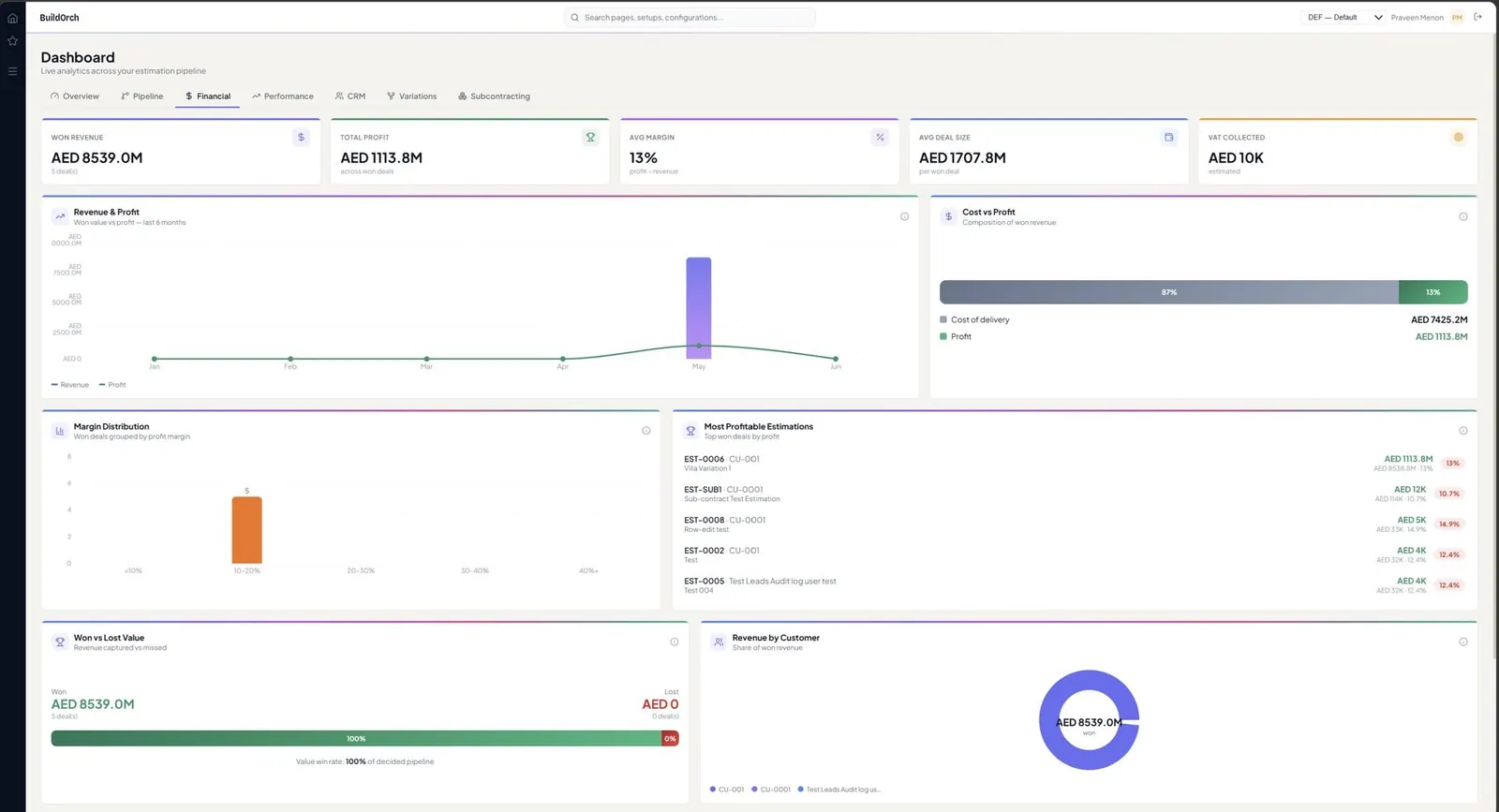
app.buildorch.io / analytics / financial
BuildOrch Financial analytics dashboard
FinancialCost composition, profit margin, job profit analysis & distribution
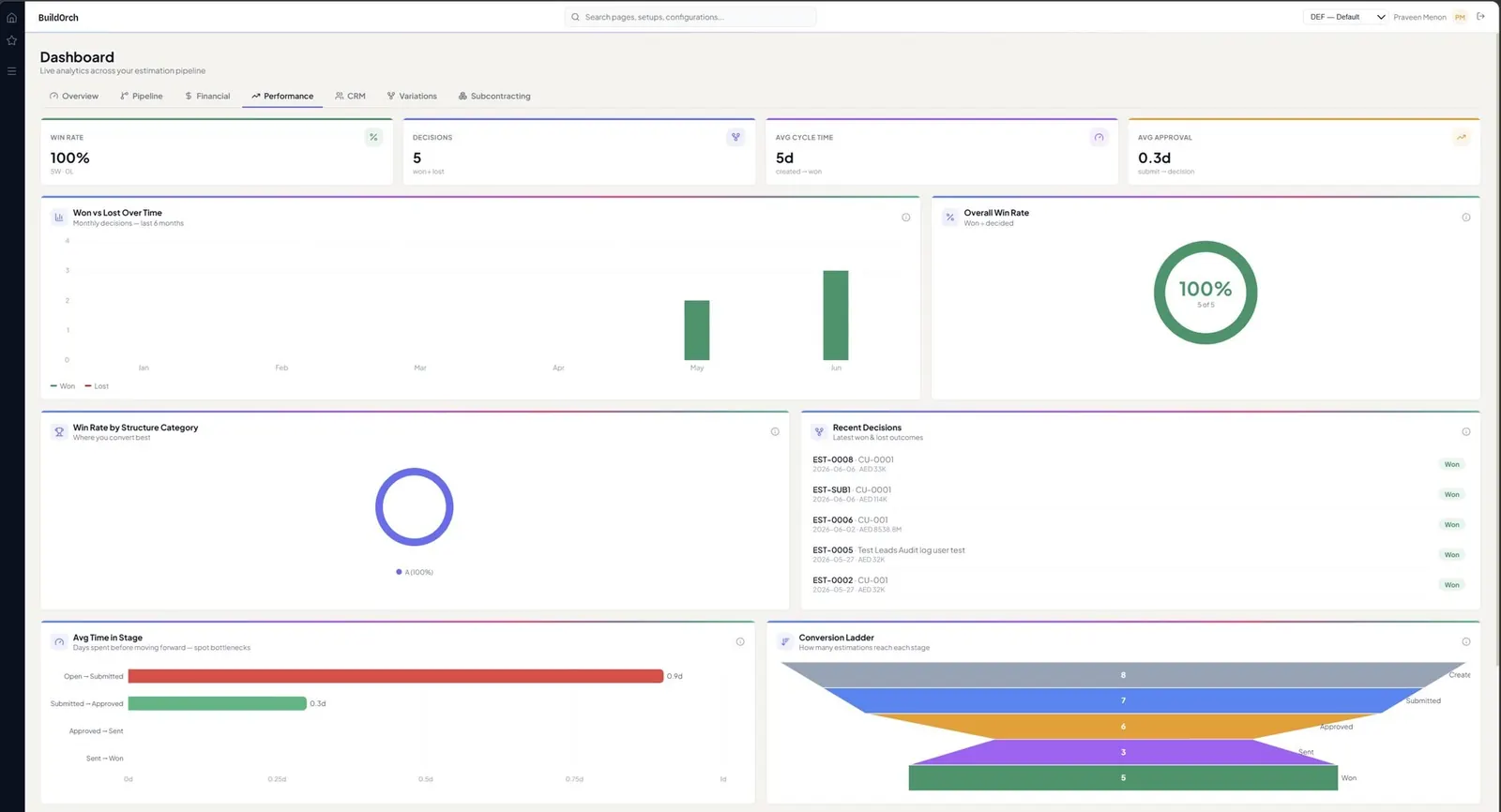
app.buildorch.io / analytics / performance
BuildOrch Performance analytics dashboard
PerformanceOverdue work, estimator workload, monthly trend & approval turnaround
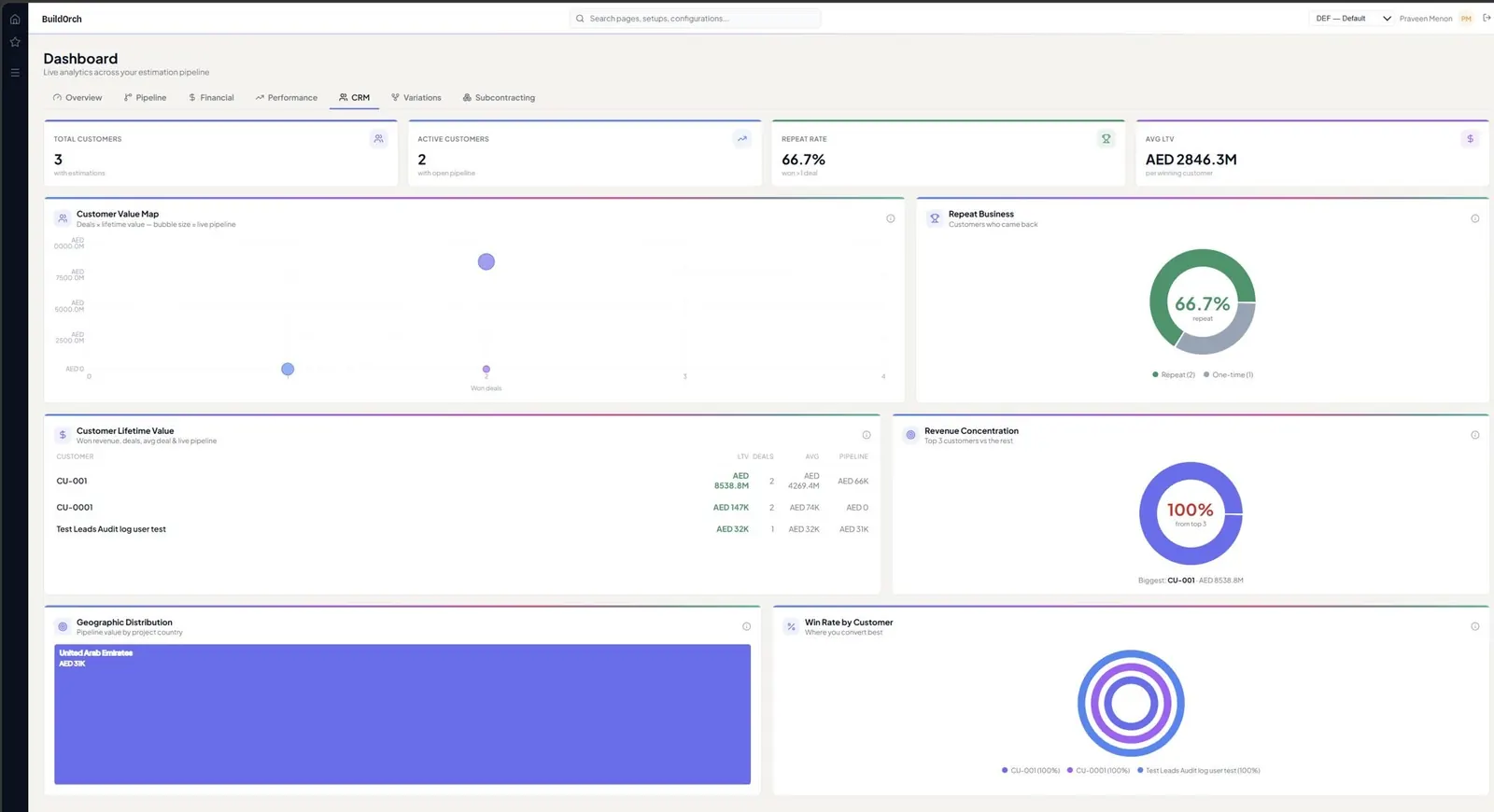
app.buildorch.io / analytics / crm
BuildOrch CRM analytics dashboard
CRMLeads & customers by group, lead conversion, concentration risk
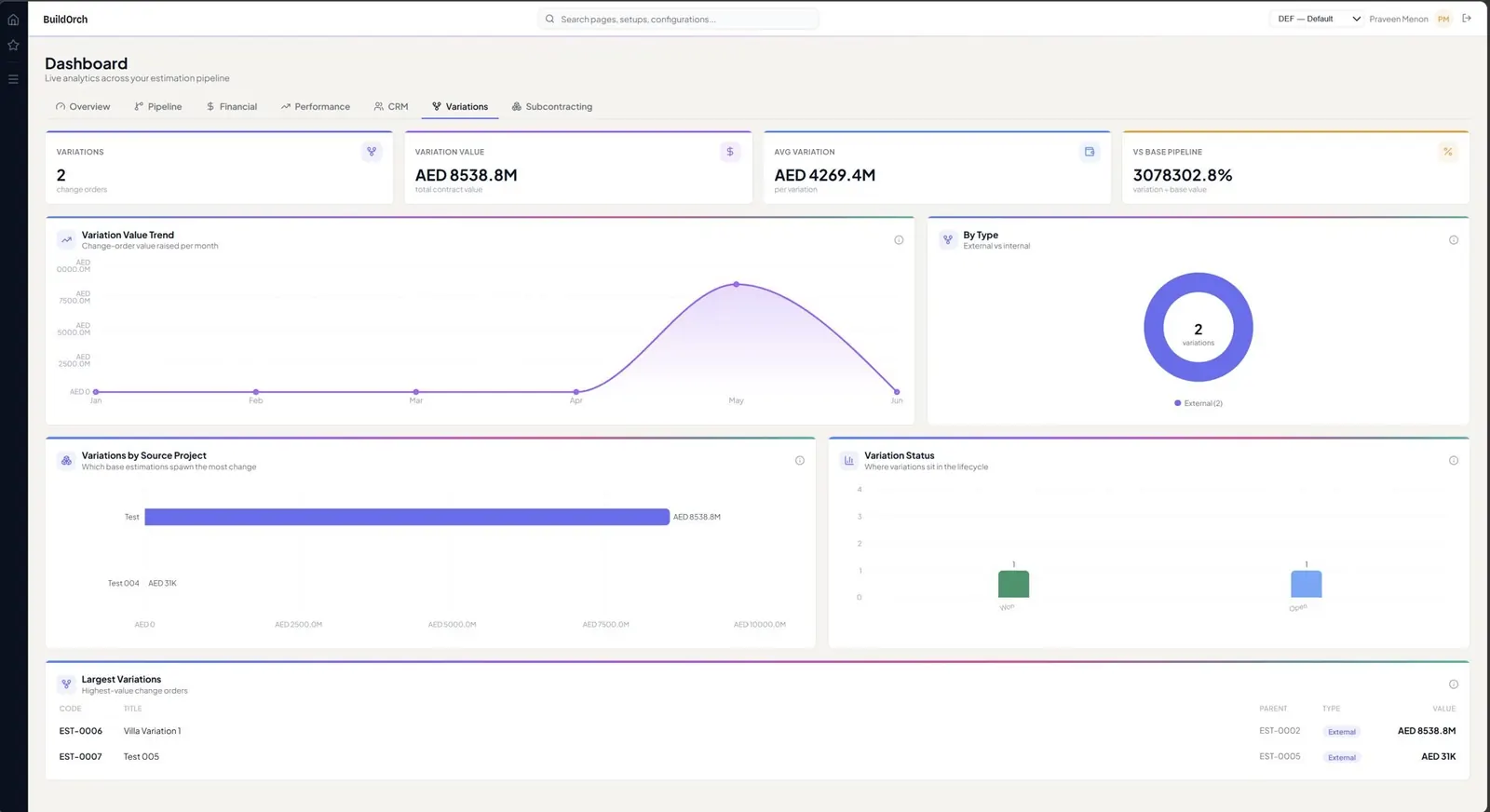
app.buildorch.io / analytics / variations
BuildOrch Variations analytics dashboard
VariationsVariation count, value vs original, frequency & profitability impact
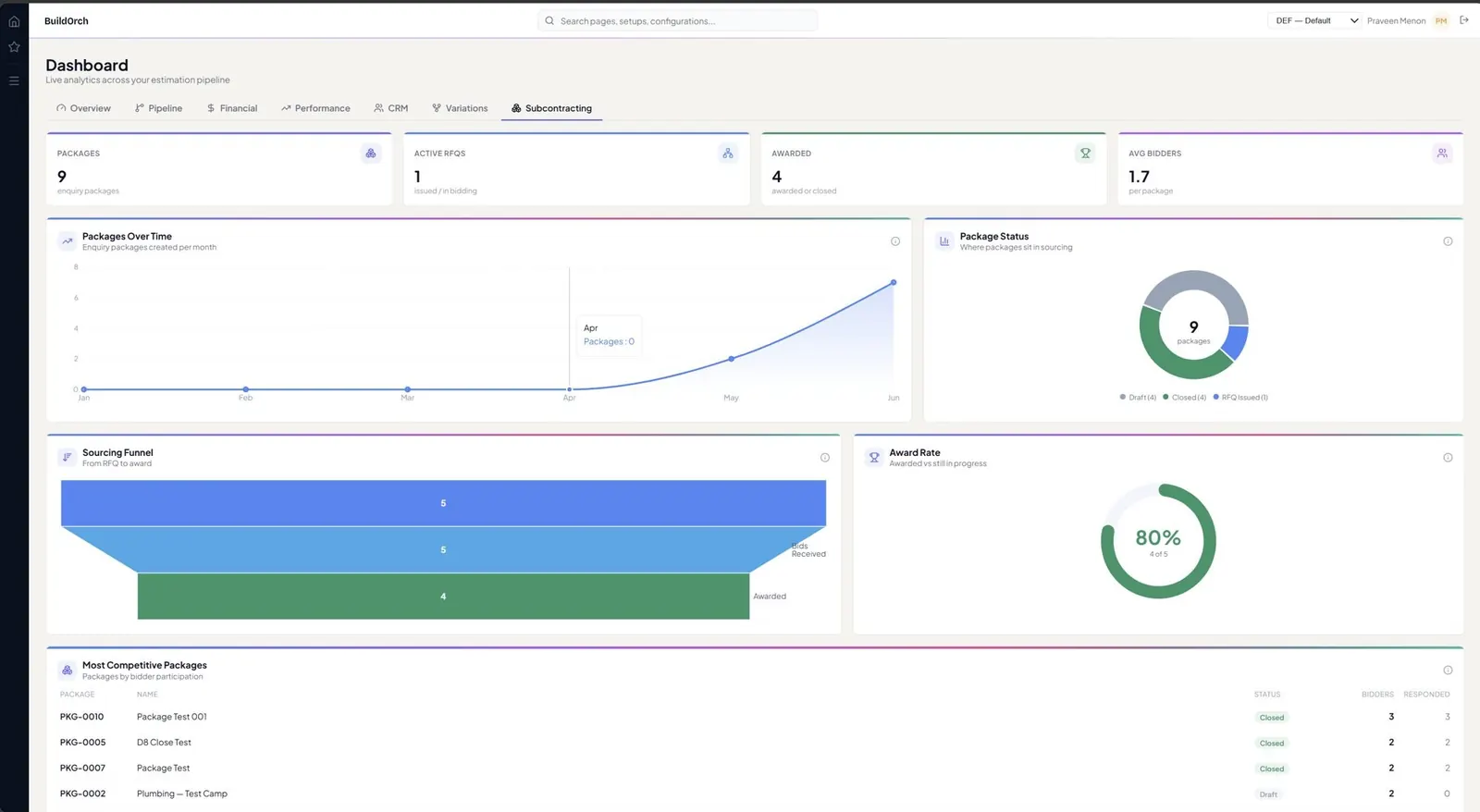
app.buildorch.io / analytics / subcontracting
BuildOrch Subcontracting analytics dashboard
SubcontractingPackage pipeline, competition health, subcontractor rankings & savings
Overview Pipeline health, win rate, quotations & estimations needing attention
Questions

Things you might be wondering.

Does BuildOrch work with my ERP, or only with Dynamics 365?
BuildOrch is built to be ERP-agnostic with a standards-based connector layer, so it can integrate with most modern ERP and finance systems. It also ships with a deep, native integration to Microsoft Dynamics 365 Finance & Operations — so D365 customers get the richest experience out of the box.
Who is BuildOrch for?
Builders, contractors, MEP specialists, civil & infrastructure firms and EPC contractors — anyone whose business depends on winning work with fast, defensible estimates and then delivering it with real project controls: planning, earned value, schedule analysis and risk.
Is my data private when I use the AI features?
Yes. Your prompts and documents are processed through an isolated AI tenancy. Nothing is used for model training, and all interactions are logged against your own tenant for audit.
Do you support multi-entity, multi-currency estimating?
Every estimation inherits its currency and country defaults from the selected Legal Entity. Reports, prompts, summary tabs and revision history all respect that currency context throughout the system.
What happens to internal (cost-only) projects?
Internal projects automatically disable Client & Contact, Commercial & Contractual, Markup % and Discount % across the line grid and Cost Details modal — so cost-only work is always estimated correctly.
Can I see the source data behind every number?
Yes. Every cell on every report — estimate, earned-value or claim — is traceable back to its source line, master rate, baseline and revision snapshot. Reports are branded with your Legal Entity logo, address, phone, email and TRN automatically.
Isn't this just estimating? What's the "project management" part?
The estimate is the starting point, not the finish line. Once a job is won, BuildOrch builds a phased, cost-loaded Work Breakdown Structure from the awarded estimate, then drives Portfolio Planning, Earned Value Management, Schedule Comparison, a Risk Register and Schedule Risk Analysis from the same data — so estimating and delivery share one system of record.
Where does the project plan / WBS come from?
From the work you already priced. The WBS Composer drafts a full phased, cost-loaded WBS — phases, tasks and cost lines — directly from the awarded estimate in one step, mapping material and equipment to items, labour to hours and overhead and sub-contract to expenses. You review and confirm it before anything is committed; the plan is built, never invented.
Do you handle earned value (EVM)?
Yes. BuildOrch tracks Planned Value, Earned Value and Actual Cost with CPI, SPI and variances, plots S-curves to your data date, and produces a branded EVM report. AI Variance Insights turns the curves into a plain-English read of where the project stands.
Can it help build a delay or extension-of-time claim?
Schedule Comparison diffs two plans — or a plan against live progress — to surface slippage, the driving path and concurrency. The AI Claim Narrative drafts a plain-English EOT narrative, classifies delay (employer vs contractor, excusable vs not) and flags concurrency, giving you a defensible first draft.
How does the Monte-Carlo schedule risk analysis work?
It runs thousands of simulations across your schedule to produce P50 / P80 completion dates, a confidence S-curve and a tornado of what drives the date. AI calibrates optimistic and pessimistic bands per activity from activity type and history, explains the results in plain English, and recommends where compression buys you the most P80 gain.
How do progress claims and payment certificates work?
Progress is measured against the WBS, and the claim is built from that measurement — previous, this period and cumulative on every line. Retention, advance recovery and approved variations are applied on the certificate itself, and it issues on your own letterhead once approved.
Can I track site quality issues and NCRs?
Yes. Observations, snags, defects and NCRs sit in one register, each carrying a severity and an issue type that are weighted, so a hairline crack and a structural defect never score the same. Issues are assigned, tracked and closed with evidence attached.
What do inspections and ITPs look like?
Reusable checklist templates per work type, with hold points that block sign-off until they are formally cleared and witness points that record attendance. A failed check opens a quality issue rather than ending at “failed”.
How does sectional handover and the defects liability period work?
Handover happens per section, so a tower or a pump station can be taken over on its own date without waiting for the last section. Open snags must be closed with evidence first, and the certified date starts that section’s defects liability clock.
How does the Portfolio Command Center pull it all together?
It rolls cost performance, schedule performance and risk exposure up across every live project, with a prioritisation watchlist that points leadership at what needs attention first. Actuals flow in from your ERP, so the portfolio picture is always current.

Stop working on spreadsheets & disconnected systems.
Run entire operations on BuildOrch.

See exactly how BuildOrch fits your project lifecycle — and your existing ERP. Talk to our team for a tailored walkthrough.